

How to Automate Appointments: 2026 Small Business Guide
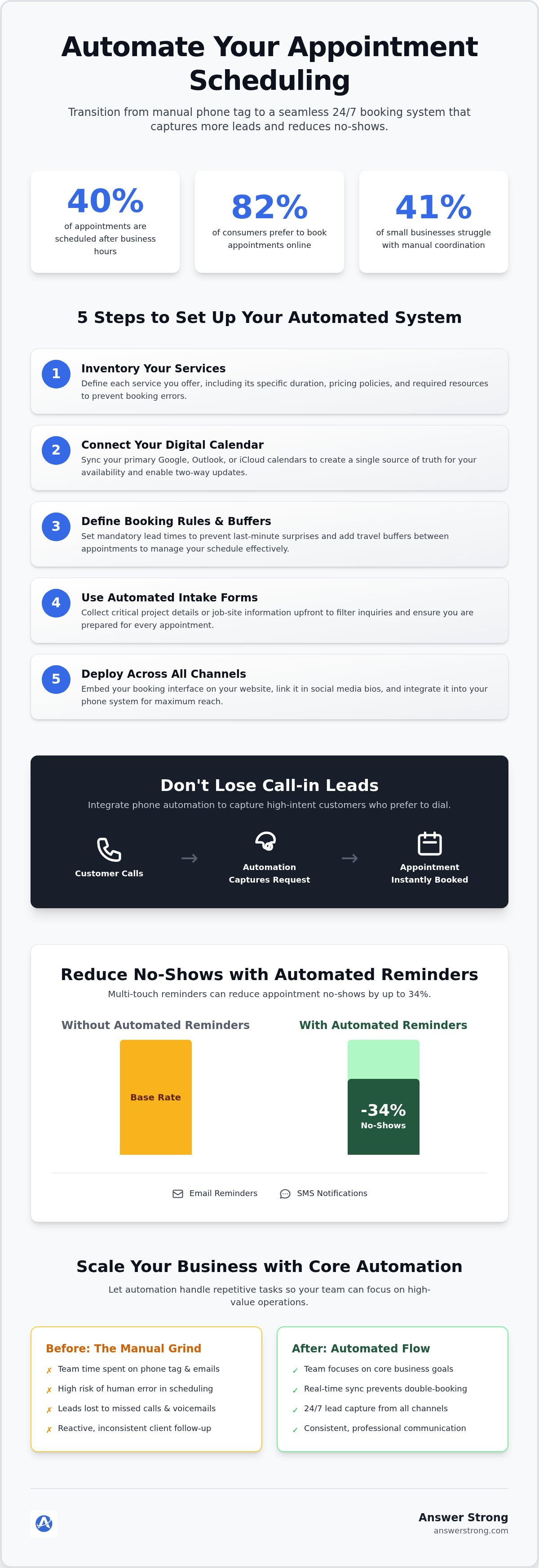
Recent research reveals that 40% of appointments are now scheduled after business hours. If your phone stays silent once you leave the office, you're likely losing revenue to competitors who remain accessible. You already feel the drain of missed calls and the friction of back-and-forth emails just to confirm a single time slot. It's a repetitive cycle that limits your growth and exhausts your team. Learning how to automate appointment scheduling is the most direct way to break this pattern and reclaim your focus.
You deserve a calendar that fills itself without constant manual intervention. This 2026 guide provides the exact steps to transition from phone tag to a seamless, 24/7 automated booking system. We'll show you how to capture high-intent leads more effectively and use automated reminders to reduce no-shows by up to 34%. You'll learn to build a professional customer experience that operates as a quiet, powerful motor for your business. It's time to reduce the administrative grind and start scaling with increased precision.
Table of Contents
Understanding the Fundamentals of Appointment Automation
Automated appointment scheduling is more than just a digital calendar. It's a self-service engine that allows clients to book, reschedule, or cancel appointments without ever picking up the phone. For years, service businesses relied on "phone tag" to fill their days. This manual process is slow and creates unnecessary friction for everyone involved. By learning how to automate appointment scheduling, you replace that friction with a 24/7 digital workflow that works even when you're off the clock.
Modern clients expect this level of autonomy. Research shows that 82% of consumers prefer to book appointments online rather than by phone. Appointment scheduling software facilitates this by bridging the gap between your available time and the customer's intent. It transforms your business from a reactive operation into a proactive, lead-capturing machine. When you remove the barriers to booking, your conversion rates naturally climb. You're meeting the customer exactly where they are, exactly when they're ready to commit.
The Core Components of a Scheduling System
A robust system relies on three specific pillars to maintain order. First, real-time synchronization is vital. Your system must connect to your primary business calendar to prevent double-bookings and scheduling conflicts. Second, you need customizable availability rules. This allows you to set "buffer" times for travel between jobs or define specific durations for different service types. Finally, automated sequences provide the backbone of professional communication. Confirmations and reminders sent via email or SMS keep the client informed and engaged without requiring a single minute of your time.
Why Manual Scheduling is Costing Your Business
Sticking to manual methods creates a heavy, hidden tax on your growth. Industry data indicates that 41% of small businesses struggle with the back-and-forth nature of manual coordination. This administrative time is expensive. It pulls your focus away from high-value technical work or strategic planning. If a high-intent lead calls while you're busy and hits your voicemail, they'll likely call a competitor immediately. Manual entry also invites human error. A single mistyped digit or a forgotten reminder leads to empty time slots. These missed opportunities directly impact your bottom line. Learning how to automate appointment scheduling isn't just about saving time; it's about building a scalable foundation for 2026.
5 Steps to Set Up Your Automated Scheduling System
Setting up a robust system requires a logical framework. First, inventory your services. Define exactly what you offer, how long each task takes, and your pricing policies. This clarity prevents the system from booking a 15-minute consult for a job that requires two hours. Once these parameters are locked in, you can move to the technical integration. Understanding how to automate appointment scheduling starts with this foundational business logic.
Connecting Your Digital Calendar
Your calendar is your business's single source of truth. Connect your primary Google, Outlook, or iCloud account to ensure the system sees every existing commitment. Syncing both work and personal calendars is a smart move to protect your downtime. It ensures you aren't booked for a client meeting during a family event. Always verify that you have two-way synchronization enabled. This means if you manually add an appointment on your phone, your booking page updates immediately.
Defining Booking Rules and Buffers
Automation should never lead to chaos. Set mandatory lead times to prevent "surprise" appointments appearing on your schedule five minutes before they start. For mobile service providers, like HVAC technicians, travel buffers are essential. These 15-to-30-minute windows between jobs prevent a domino effect of delays. You can also limit the number of specific high-intensity appointment types per day to manage your team's energy levels.
Before a lead secures a spot, use automated intake forms. These forms collect job-site information or project details upfront. This filters out low-intent inquiries and ensures you have the data needed to prepare. Speed is critical here. According to research on online leads, the window to convert a prospect is incredibly short. Automation ensures you respond instantly while the intent is highest.
Finally, deploy your booking interface across all channels. Add it to your website, link it in your social media bios, and integrate it into your phone system. A multi-channel approach ensures you capture leads regardless of where they find you. For those looking to streamline this process, Core Automation provides a centralized platform to manage these steps effectively. It's an efficient way to turn your digital presence into a 24/7 sales engine.
Bridging the Gap: Automating Bookings from Inbound Phone Calls
While digital booking links are now standard, a significant segment of high-intent prospects still prefers a direct phone call. If you're in the field or occupied with another client, these calls often hit a voicemail box, which frequently results in the lead moving to a competitor. Learning how to automate appointment scheduling must include a robust strategy for these inbound voice inquiries. An automated phone workflow acts as a digital front desk, greeting callers and guiding them toward a booking path without requiring you to stop your current task.
Using Core Automation for Phone-to-Booking Workflows
Core Automation provides a sophisticated way to manage these voice interactions naturally. Instead of a static recording, intelligent call routing directs customers based on their specific service needs. This system captures lead details and requested services during the interaction, flowing directly into your centralized dashboard at portal.answerstrong.com. It handles repeatable communication tasks and FAQ responses so your team can focus on complex technical jobs. This integrated approach turns your business phone number into a proactive tool for capturing interest at the moment it's highest.
Automated Text-Back for Missed Calls
Responsiveness is a primary factor in lead conversion. If a call cannot be answered, an automated text-back feature provides an immediate SMS response. This message includes a direct booking link, allowing the prospect to secure a spot while their interest is high. This approach reduces the likelihood of a lead calling a competitor. By mastering how to automate appointment scheduling through these integrated phone and text workflows, you maintain a professional presence around the clock. You can find more details on these integrated workflows at answerstrong.com/core-automation. This simple bridge ensures your business stays accessible, even when you aren't physically available to talk.
Best Practices for Reducing No-Shows and Managing Growth
Securing a booking is only half the battle. A filled calendar is worthless if clients don't show up. High no-show rates drain your resources and disrupt your team's rhythm. When you master how to automate appointment scheduling, you gain the tools to protect your time and ensure your revenue remains predictable. Implementing a multi-touch reminder strategy is the most effective way to keep your business running smoothly. By combining email and SMS notifications, you reach clients where they're most likely to see the message.
Intake forms are another critical component of a professional workflow. Use these forms to collect necessary job-site information or preparation details upfront. This ensures your technicians arrive with the right tools and knowledge. It also qualifies the lead further. A client who takes the time to provide specific details is far more likely to honor the appointment. If a conflict does arise, offer easy rescheduling options. Providing a simple link to change the time prevents outright cancellations and keeps the lead in your pipeline.
Designing Effective Reminder Sequences
Timing is everything. A 24-hour reminder gives the client enough notice to reschedule if something has changed. A 1-hour reminder serves as a final nudge to ensure they're ready. Industry data shows that automated reminders can reduce no-shows by 29% to 34%. Your messages should include the location, any specific preparation instructions, and a professional, helpful tone. Clear communication builds trust and reinforces your brand's reliability before you even arrive at the door.
Using Data to Refine Your Schedule
Automation provides a wealth of data that manual systems simply can't match. Analyze your booking patterns to identify high-demand time slots. If Friday mornings are always full, you might adjust your availability or staffing levels to meet that demand. Track your conversion rates from the initial inquiry to the final booked appointment. This helps you identify where leads might be dropping off in the process. Monitoring no-show rates allows you to adjust your reminder frequency or messaging style based on actual results.
Managing this growth requires a system that scales with you. You can explore how Answer Strong helps you manage these workflows to stay responsive while you focus on the technical side of your business. Using data to refine your schedule ensures your business remains efficient as it expands. You aren't just filling slots; you're optimizing your entire operation for maximum impact. This proactive approach turns a simple calendar into a strategic asset for your company's future.
Scaling Your Business with Answer Strong Core Automation
Answer Strong provides the infrastructure to turn your business into a high-performance engine. Core Automation is a SaaS platform designed specifically for service professionals who can't afford to stay tethered to a desk. It manages calls, texts, and appointments around the clock. By handling approved, repeatable communication tasks, it allows you to regain control over your schedule. You no longer have to choose between finishing a job and answering a lead. The system acts as a vigilant partner that keeps your pipeline moving reliably.
Learning how to automate appointment scheduling is a foundational step toward long-term growth. When your booking process is automated, you remove the administrative bottlenecks that often limit a small business. You can handle a higher volume of inquiries without a corresponding increase in your administrative headcount. This 24/7 responsiveness is a significant competitive advantage, ensuring you capture interest at the moment it's highest. This level of availability helps you scale without the stress of managing a larger team.
A System Built for Service Professionals
HVAC companies, salons, and contractors face unique communication challenges where work is often mobile and hands-on. Specialized automation addresses these needs by centralizing all interactions into a single dashboard. You can manage your business phone numbers and appointments at portal.answerstrong.com. This transition from a simple phone service to advanced automation creates a professional image that builds immediate trust. Clients see a responsive system and perceive your business as a leader in its field. It replaces the stress of growth with the stability of a well-organized operation.
Getting Started with Your New Booking Workflow
The implementation process is designed for speed and flexibility. You can choose to use your existing business number or secure a new local or toll-free number through the platform. This allows you to maintain your brand identity while upgrading your capabilities. You can explore different options like the Essential Plan or Starter Plan based on your current business volume. Each level provides access to Conversational Core Minutes to power your automated interactions. These plans grow with you as your lead volume increases.
The administrative workload of manual scheduling is a barrier to your success. By removing that barrier, you clear the path for more complex, high-value work. It's time to let technology handle the routine so you can focus on the results. Explore Answer Strong and Core Automation to see how this invisible motor can drive your business forward in 2026. This proactive approach ensures your background processes work effectively even when you aren't watching.
Future-Proof Your Business Growth
Transitioning from the administrative grind of manual phone tag to a streamlined digital workflow is a strategic necessity in 2026. You've seen how setting up clear booking rules, syncing your calendars, and automating missed call responses can protect your revenue. Mastering how to automate appointment scheduling isn't just about internal efficiency; it's about providing a professional experience that meets modern consumer expectations. When you remove the friction from the booking process, you clear the path for higher conversion rates and a more predictable schedule.
You can start scaling your operations today without the need for extra administrative staff. Build a Stronger Business Communication System with Answer Strong and leverage professional 24/7 Core Automation. With a centralized activity tracking dashboard specifically designed for service professionals and solopreneurs, you can keep your focus on the technical work that matters most. It's time to let your background processes drive your growth with precision and energy. Your business is ready for its next phase of development, and the right automation system is the invisible motor that will take you there.
Frequently Asked Questions
How does automated appointment scheduling work for small businesses?
It works by providing a self-service portal where clients view your real-time availability and book slots themselves. The system syncs with your digital calendar to ensure accuracy. When you learn how to automate appointment scheduling, you replace manual phone tag with a digital workflow. This system captures leads 24/7, even when your office is closed. It sends instant confirmations to the customer and updates your centralized dashboard immediately.
Can I keep my existing business phone number with an automated system?
Yes, you can maintain your current business identity while upgrading your technology. Most professional systems allow you to port your existing number or use call forwarding to trigger automated workflows. Answer Strong supports both local and toll-free business numbers. This ensures a seamless transition for your loyal clients. They'll experience a more responsive service without you having to change your contact details on marketing materials or signage.
Does automated scheduling prevent double-bookings on my calendar?
Automated systems prevent scheduling conflicts through two-way calendar synchronization. The software communicates with your Google or Outlook calendar in real time. If you manually add a personal event, those hours become unavailable on your public booking page. This eliminates the risk of human error and ensures you never have two clients arriving at the same time. It provides a reliable source of truth for your daily schedule and team operations.
Can automation handle customer questions before they book an appointment?
Modern automation handles routine FAQs by providing instant answers during the intake process. You can configure the system to address common queries about pricing, service areas, or job requirements before the booking link is sent. This proactive approach filters out low-intent leads and ensures that only qualified customers reach your calendar. It builds trust by providing immediate value and clarity, which is essential for conversion in competitive service industries.
What happens if a customer needs to reschedule an automated booking?
Customers can manage their own changes through a dedicated link provided in their confirmation message. This self-service feature allows them to reschedule or cancel based on your predefined notice periods. It removes the need for back-and-forth emails or phone calls. Your calendar updates automatically, and the system can even notify you of the change. This flexibility prevents outright cancellations while keeping your administrative workload at a minimum.
Do I need special hardware to automate my phone-based bookings?
No physical hardware or VoIP equipment is required to implement these systems. Core Automation is a cloud-based SaaS platform that works with your existing devices. You can manage all activity through a centralized dashboard on your computer or smartphone. This makes it an ideal solution for service professionals who are often mobile. You get a professional phone system and booking engine without the cost or complexity of traditional office hardware.
Is automated scheduling suitable for businesses with multiple locations?
Automation is highly effective for scaling across multiple sites or service areas. You can set unique availability rules and assign specific staff members to different locations. The system manages these complexities in the background, presenting a simple interface to the client. This organization ensures that resources are allocated correctly and that each location maintains its own schedule. It provides a unified brand experience while managing localized logistical needs efficiently.
How do automated reminders help reduce appointment no-shows?
Automated reminders help by keeping your business top-of-mind without requiring manual outreach. The system sends a sequence of email and SMS notifications at strategic intervals before the appointment. These messages provide the location, prep instructions, and a professional tone. When you implement how to automate appointment scheduling, these reminders act as a quiet motor that ensures your days stay full. This consistent follow-up builds accountability and significantly reduces the chance of missed sessions.



Comments