

Automated Scheduling: 2026 Mobile Business Guide
Automated Scheduling for Mobile Businesses: How to Capture More Leads in 2026
When you're working on a job site, answering the phone isn't always possible.
You might be under a sink, on a ladder, driving between appointments, working with a customer, or using equipment that requires your full attention. For mobile service businesses, being unavailable for a few minutes can mean missing an important customer inquiry.
The problem is that customers don't always wait for a callback.
When someone needs a plumber, HVAC technician, contractor, mobile detailer, or another service professional, they often want answers immediately. If your business cannot respond, they may continue searching for another provider.
That's where automated scheduling for mobile businesses can make a meaningful difference.
The right communication system can help answer customer inquiries, collect lead information, support appointment requests, send follow-ups, and route conversations while you focus on the work in front of you.
AnswerStrong is designed to help businesses create that kind of responsive workflow. Its Intelligent Front Office combines professional business communication tools with automation that can help manage customer conversations and routine tasks around the clock.
The Benefits of AnswerStrong for Your Business
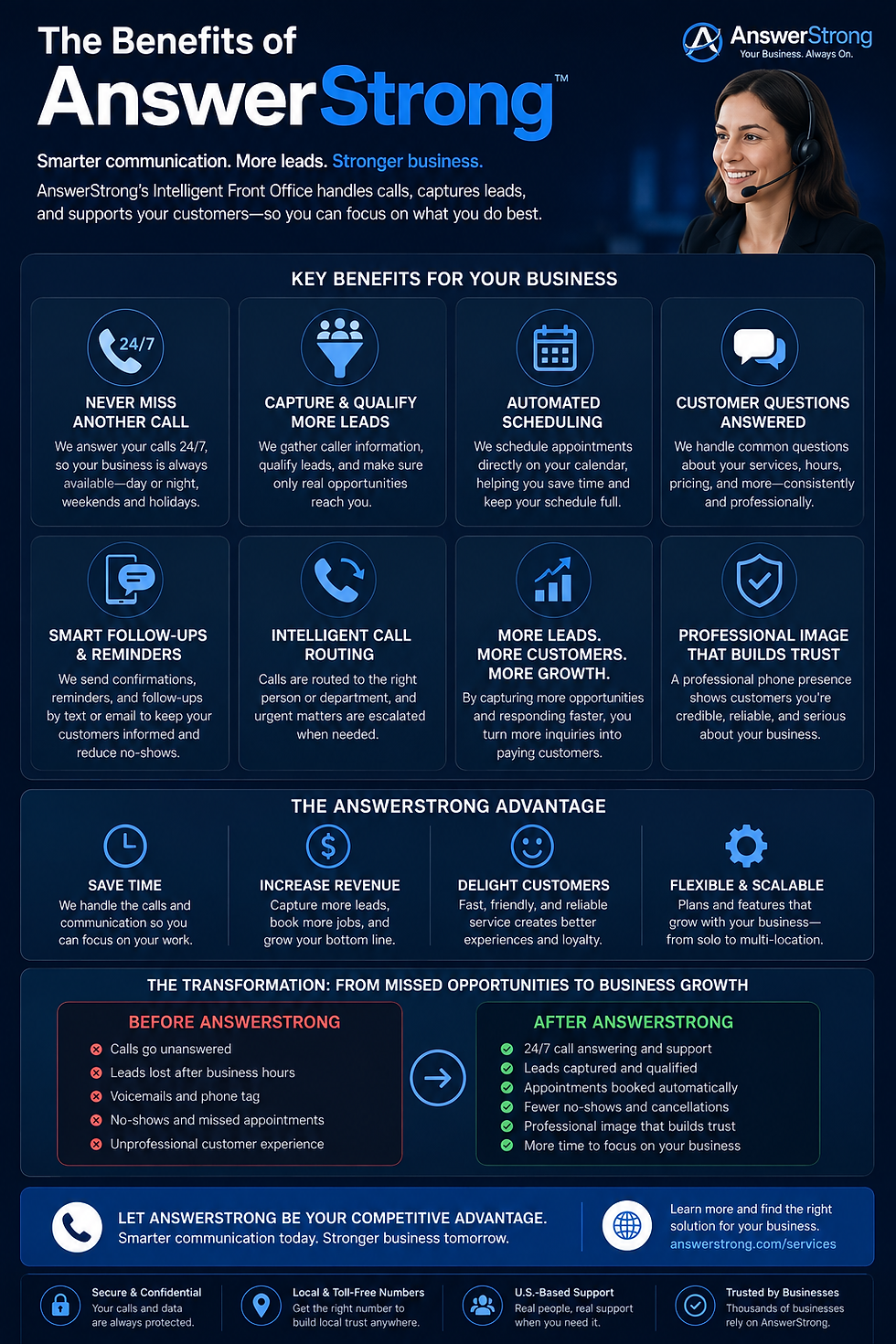
AnswerStrong helps businesses stay responsive, capture more opportunities, manage customer communication, support appointment scheduling, and create a stronger professional experience.
Table of Contents
The Evolution of Mobile Business Scheduling in 2026
Why Mobile Businesses Need More Than a Digital Calendar
Key Features to Look for in an Automated Scheduling System
Turning Inbound Calls Into Appointment Opportunities
How Mobile Industries Use Automation
Building a More Responsive Business With AnswerStrong
Frequently Asked Questions
The Evolution of Mobile Business Scheduling in 2026
Automated scheduling for mobile businesses is about more than putting appointments on a digital calendar.
A modern scheduling workflow can connect customer communication with business action. Depending on the setup and integrations being used, it can help answer questions, collect customer information, support appointment requests, manage follow-ups, and route conversations to the right person.
This is particularly valuable for businesses that spend most of their day away from a desk.
A traditional scheduling process can be slow:
A customer calls.
You miss the call because you're working.
The customer leaves a voicemail—or hangs up.
You return the call later.
The customer may no longer be available.
Several messages are exchanged before an appointment is arranged.
That process creates friction for everyone involved.
An automated workflow can help reduce the gap between customer interest and business action.
AnswerStrong's Intelligent Front Office is designed to help businesses manage incoming calls, customer questions, lead collection, appointment scheduling, follow-ups, and routing when owners or staff cannot respond immediately.
Why Traditional Calendars Fall Short for Mobile Professionals
A calendar is useful, but a calendar doesn't answer the phone.
It doesn't greet a new customer, explain your services, collect lead details, or respond to common questions about your business.
Mobile professionals often need something more connected.
Customers may call to ask:
Do you provide this service?
What are your business hours?
Do you serve my area?
Can I schedule an appointment?
What information do you need from me?
Who should I speak with about my request?
If every one of these conversations requires you to stop working and personally answer the phone, communication can quickly become a distraction from the work that generates revenue.
AnswerStrong can be configured using information about your business, including your hours, services, FAQs, appointment information, routing preferences, and escalation instructions.
Why Mobile Businesses Need More Than a Digital Calendar
A mobile business faces challenges that a traditional office-based company may not.
Your availability can change throughout the day. Jobs may take longer than expected. Emergency calls can interrupt your schedule. Travel time can affect when you're available.
That's why an effective automated scheduling workflow should connect with your broader communication process.
Real-Time Customer Communication
Customers don't always begin with a booking link.
Many people still prefer to call and ask questions before making an appointment.
For example, someone may want to know whether you provide a particular service, whether you're available soon, or what the next step should be.
AnswerStrong's Intelligent Front Office can help manage incoming customer conversations by answering approved questions, collecting information, scheduling appointments, taking messages, and routing calls according to established business workflows.
Lead Information Collection
Before accepting a job, you may need important details about the customer.
Depending on your business, that could include:
Name
Phone number
Email address
Service requested
Location
Preferred appointment time
Details about the customer's needs
Collecting this information early can help you understand the opportunity before personally stepping into the conversation.
AnswerStrong can support lead collection and qualification workflows using the business information and rules provided during setup.
Key Features to Look for in an Automated Scheduling System
Choosing a system for automated scheduling for mobile businesses requires looking beyond a simple calendar.
The strongest workflows connect communication, lead management, scheduling, and follow-up.
Automated Call Handling
Your phone can ring at any time.
You may be helping another customer, working on a job site, driving, or away from the office.
An automated front office can help ensure that customers receive a professional response even when you can't personally answer.
AnswerStrong's Intelligent Front Office can answer calls, determine why a customer is contacting the business, respond to approved questions, collect information, and move the conversation through an established workflow.
Appointment Scheduling Support
Appointment scheduling should follow the rules established by your business.
AnswerStrong supports appointment-related workflows that can help customers request or book appointments based on the scheduling rules and availability connected to your business.
This means your scheduling process can continue moving forward even when you're physically unable to stop working and answer the phone.
Follow-Ups and Reminders
The customer journey doesn't end when someone contacts your business.
Customers may need:
Appointment confirmations
Reminders
Follow-up messages
Instructions about next steps
Notifications about their request
AnswerStrong can support follow-up workflows and appointment reminders, helping businesses maintain communication without requiring employees to manually manage every interaction.
Call Routing and Human Escalation
Automation is most effective when it knows when to involve a person.
A system may be able to answer a routine question about your business hours. But a complicated request, complaint, emergency, or unusual situation may require human judgment.
AnswerStrong can route and escalate conversations based on established business rules so customers can be directed to the appropriate person when needed.
Turning Inbound Calls Into Appointment Opportunities
For many mobile businesses, the phone is still one of the most important sources of new customers.
The challenge is that leads often arrive when you're least able to respond.
Your phone may ring while you're:
Driving between job sites
Completing a repair
Working with a customer
Using equipment
Meeting with a client
Outside normal business hours
You can't always answer immediately.
But your business can still have a process for responding.
The Phone-to-Calendar Connection
AnswerStrong sits between customer communication and business action.
The platform is designed to help manage interactions across calls, texts, emails, website inquiries, and appointment requests. Its Intelligent Front Office can help move customer conversations forward according to your established workflows.
For example, a customer may call and explain what they need.
The system can help:
Greet the customer professionally.
Determine the reason for the call.
Answer approved questions.
Collect relevant information.
Support scheduling or appointment requests.
Take a detailed message when necessary.
Route or escalate the conversation.
Save information for your team to review.
This creates a more organized process than relying entirely on missed calls and manual callbacks.
Supporting Missed-Call Follow-Up
Missed calls can create communication gaps, particularly for businesses with small teams.
AnswerStrong can support notifications, messages, and follow-up workflows that help ensure customer requests don't simply disappear into a forgotten voicemail inbox.
The goal is simple: make it easier for your business to respond while customer interest is still active.
How Mobile Industries Use Automation
Different industries have different workflows, but many share the same communication challenge.
Employees are busy doing the work customers hired them to do.
HVAC and Home Service Businesses
HVAC technicians, plumbers, electricians, and contractors often spend their days in the field.
Stopping to answer every incoming call can interrupt both the technician and the customer currently receiving service.
An automated communication workflow can help manage routine inquiries such as:
Business hours
Available services
Service areas
Appointment requests
Customer information
Next steps
AnswerStrong can help home service businesses create workflows around incoming calls, lead collection, appointment-related communication, routing, and follow-ups.
For additional information about HVAC communication automation, see HVAC SMS Marketing Automation: 2026 Comparison & Strategy Guide.
Contractors and Field Service Professionals
Contractors often move between locations throughout the day.
Their schedules can change because of travel, job complexity, customer availability, and unexpected requests.
A connected communication system can help keep customer inquiries organized while the contractor remains focused on fieldwork.
Instead of relying exclusively on manual callbacks, businesses can use AnswerStrong to help collect information, manage routine questions, support appointment workflows, and route conversations according to business rules.
Salons, Barbershops, and Personal Service Businesses
Personal service professionals face a similar problem.
When you're actively serving a customer, answering the phone can interrupt the experience.
A booking link alone doesn't solve every communication challenge because customers may have questions before they're ready to schedule.
They might ask about:
Services
Pricing information
Business hours
Availability
Walk-ins
Location
Rescheduling
AnswerStrong Core Automation can help manage approved, repeatable customer interactions while allowing professionals to remain focused on the client in front of them.
Building a More Responsive Business With AnswerStrong
A strong communication system begins with giving customers a reliable way to reach your business.
AnswerStrong offers professional business phone services and automation tools designed to help businesses manage customer communication.
Depending on your needs, you can use a new local or toll-free business number or, where supported, connect an existing business number through call forwarding or a number-transfer process.
You can also explore AnswerStrong's professional business phone number options.
Configure the System Around Your Business
Every business operates differently.
That's why your communication workflow should reflect your actual business rules.
AnswerStrong can be configured using information such as:
Business hours
Services
Frequently asked questions
Appointment information
Call-routing preferences
Notification preferences
Escalation procedures
The Intelligent Front Office then uses that information to help manage routine customer communication according to your established workflow.
Stay Available Without Being Tied to Your Phone
Growth shouldn't require you to personally answer every phone call.
AnswerStrong can support businesses during:
Busy periods
After-hours inquiries
Weekends
Vacations
Sick days
Customer appointments
Fieldwork
Automation handles approved, repeatable communication while human team members remain available for conversations requiring expertise and judgment.
Start With the Right Level of Support
Not every business needs the same communication setup.
Some businesses may only need a professional business phone number with call management tools.
Others may need an Intelligent Front Office that actively helps answer customer inquiries, capture leads, schedule appointments, send follow-ups, and manage routine communication.
You can explore AnswerStrong's service options to find a setup that fits your business.
Future-Proof Your Mobile Business Communication
For mobile businesses, the challenge isn't just finding more customers.
It's being available when those customers try to reach you.
You can't always stop working to answer the phone. But you can build a communication system designed to keep customer conversations moving forward.
Automated scheduling for mobile businesses can help create a more responsive workflow by supporting:
Incoming call handling
Customer questions
Lead collection
Appointment requests
Scheduling workflows
Follow-up communication
Reminders
Call routing
Human escalation
With AnswerStrong, businesses can combine professional phone services with an Intelligent Front Office designed to help manage customer communication.
You focus on delivering great service.
Your communication system helps make sure customers have a path to reach your business.
Frequently Asked Questions
What is automated scheduling for mobile businesses?
Automated scheduling for mobile businesses uses technology to support appointment-related workflows without requiring a business owner or employee to manually handle every customer interaction.
Depending on the configuration and connected tools, automation can help collect customer information, support appointment requests, manage scheduling workflows, and send follow-up communication.
Can AnswerStrong help schedule appointments?
Yes. AnswerStrong's Intelligent Front Office can help businesses manage appointment requests and scheduling workflows based on the scheduling rules and availability connected to the business.
Can I keep my existing business phone number with AnswerStrong?
Depending on your current provider and configuration, you may be able to connect your existing number through call forwarding or a supported number-transfer process. Requirements and timelines can vary.
Does automation replace the need for a receptionist?
Not necessarily.
Some businesses use automation as primary communication support, while others use it alongside receptionists or existing staff during busy periods, after hours, vacations, or other times when additional coverage is helpful.
Can AnswerStrong handle after-hours customer inquiries?
AnswerStrong can be configured with business-hours and after-hours workflows to help manage customer communication when your team isn't immediately available.
What happens when a customer has a complicated question?
The Intelligent Front Office is designed to handle approved, repeatable tasks. When a situation requires human judgment, technical expertise, negotiation, or sensitive assistance, the conversation can be routed or escalated to the appropriate person based on your established workflow.
Do I need special hardware to use AnswerStrong?
AnswerStrong provides cloud-based business communication services, allowing businesses to manage communication through the platform without requiring a traditional physical office phone setup. Specific features depend on the service and configuration selected.
How do automated reminders help mobile businesses?
Automated reminders and follow-up messages can help businesses maintain communication around appointments and customer requests without requiring staff to manually send every notification.


Comments